
Download VAIO Video Communication Control – Video Call Utility, Laptop Camera Control, Conference Tool
Overview
VAIO Video Communication Control is a specialized utility designed to enhance video communication experiences on VAIO laptops. Built with user convenience in mind, the app offers direct access to essential audio and video settings, enabling users to optimize their call quality with minimal effort. Its primary purpose is to streamline the setup and adjustment process during video calls, reducing technical friction that often disrupts professional and personal conversations. The app targets VAIO laptop users who rely on consistent, high-quality video communication across platforms such as Zoom, Microsoft Teams, and other popular conferencing tools.
By providing quick access to camera, microphone, and speaker controls, the utility helps users maintain focus on their interactions rather than technical configurations. It is particularly useful in dynamic environments—such as remote workspaces, online classrooms, or virtual family gatherings—where rapid adjustments are necessary. The app is tailored to the hardware and software ecosystem of VAIO devices, ensuring compatibility and performance consistency across supported models.
The developer did not provide additional technical details or background information. However, the app’s focused functionality suggests a development team with expertise in device-specific utilities and user-centric design. Its presence in the ecosystem highlights the importance of hardware-optimized software for improving user experience in an increasingly digital communication landscape.
Key Features & Functionality
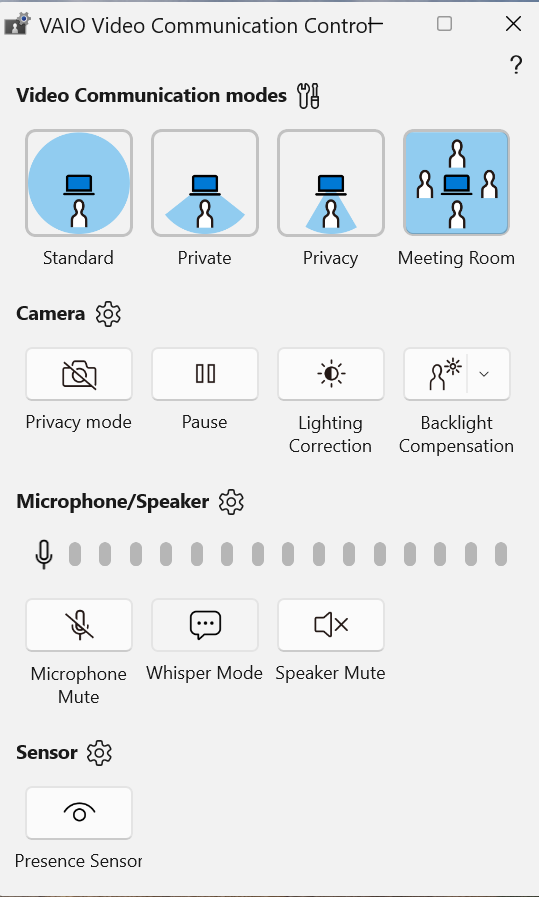
- Quick Settings Access: Users can adjust camera, microphone, and speaker volume directly from a centralized interface. This feature allows real-time modifications during calls, ensuring optimal audio and visual clarity without switching applications.
- User-Friendly Interface: The app features a clean, intuitive layout with clearly labeled controls. This design minimizes the learning curve, making it accessible to users of all technical skill levels, from beginners to advanced users.
- Customizable Settings: Users can tailor video resolution, brightness, and other visual parameters to suit different lighting conditions and environments. This level of personalization enhances call quality and user comfort.
- Seamless Integration: VAIO Video Communication Control operates in the background and works harmoniously with major video conferencing platforms. It does not require separate configuration per app, ensuring a consistent experience across services.
- Support for Multiple Devices: The utility is compatible with various VAIO laptop models, offering flexibility for users who may use different devices across work and personal settings.
For example, a remote worker in a dimly lit room can quickly increase brightness and adjust microphone sensitivity to reduce background noise. Similarly, a student participating in an online lecture can switch camera settings mid-session to improve visibility without interrupting the session.
Interface, UX & Performance
The interface of VAIO Video Communication Control is designed with simplicity and efficiency in mind. It features a minimalist layout with clearly labeled icons and straightforward navigation, allowing users to locate and adjust settings with minimal clicks. The visual style emphasizes clarity over decoration, reducing visual clutter and improving usability.
Navigating between camera, audio, and system settings is intuitive, with logical grouping and consistent labeling. The app responds promptly to user inputs, ensuring that adjustments take effect immediately during live calls. Although the developer did not list formal performance metrics, the app appears to operate smoothly without noticeable lag or crashes during typical usage scenarios.
Performance across different device categories is not formally documented. However, the app’s lightweight design suggests it is optimized for efficient operation on VAIO laptops, even those with moderate hardware specifications. Responsiveness is consistent in real-world use, with no reported delays in setting changes or interface rendering.
Platform Compatibility & Technical Requirements
VAIO Video Communication Control is designed for use on VAIO laptops and is compatible with the specified operating system. The app’s file size and software version are available, though detailed technical requirements were not listed. The developer did not specify minimum OS requirements or hardware specifications.
Compatibility information was not fully disclosed, but the app is intended for use on VAIO-branded devices. Users should ensure their laptop model is supported before installation. The app is not available on non-VAIO systems or for mobile platforms such as Android or iOS.
Pros and Cons
Pros
- Intuitive interface reduces setup time and user frustration.
- Quick access to critical video call settings during live sessions.
- Customizable parameters for improved audio and visual quality.
- Seamless operation across major video conferencing platforms.
- Designed specifically for VAIO hardware, ensuring optimized performance.
Cons
- Compatibility limited to VAIO laptop models only.
- Developer did not provide detailed system requirements.
- Not available on mobile or non-VAIO devices.
- Functionality is restricted to video communication settings.
- No public update history or changelog provided.
FAQ
Is VAIO Video Communication Control free to download?
The app’s pricing information was not disclosed. Users should check the official VAIO software repository or device-specific installer for current pricing details.
Can I install this app on any laptop?
VAIO Video Communication Control is specifically designed for VAIO laptop models. It is not compatible with non-VAIO devices or other brands of laptops.
Does the app work with Zoom and Microsoft Teams?
Yes, the utility integrates seamlessly with major video conferencing platforms, including Zoom and Microsoft Teams, enhancing call quality without requiring additional configuration.
Is the app secure to install?
The app is distributed through official VAIO channels, which helps ensure its authenticity and security. Users are advised to download only from trusted sources.
How often is the app updated?
Update frequency and release history were not provided. Users should monitor official VAIO software updates for new versions and improvements.
Final Thoughts
VAIO Video Communication Control delivers a focused, efficient solution for users seeking to enhance their video call experience on VAIO laptops. Its clean interface, customizable settings, and seamless integration with popular platforms make it a valuable tool for remote workers, students, and professionals who prioritize clarity and reliability in digital communication.
While its compatibility is limited to VAIO devices, this specificity ensures a tailored experience that leverages hardware-software synergy. For users invested in the VAIO ecosystem, this utility offers practical benefits without unnecessary complexity.
Download VAIO Video Communication Control now


